Cross-border seller group search: one keyword pulls in 40 peers, rotating four field types surfaces 300 seller-run groups
Fill in an industry keyword and eight of ten results are peers advertising. Rotate the four fields the search box accepts and the same words return several times as many seller groups (illustrative example).
Nine o’clock on a Wednesday evening. A BD selling storefront operations typed “cross-border e-commerce” into the search box and hit enter. Forty groups came back.
He opened the first three. The first had “cross-border e-commerce services” in its name, and eight of its ten latest messages were peers pushing their own packages. The second was a resource-swap chat whose last message was two months old. The third, fourth and fifth looked much the same.
An hour later he had been through all forty and noted three that might be useful. The next day, the new messages in those three were peers posting ads again.
What he actually wanted were groups built by the sellers themselves (illustrative example) — Amazon, direct-to-consumer and short-video commerce sellers. That same search box holds 300 of them. Not one of the four characters he typed reached them.
The difference was not keyword craft. It was that he only ever filled the box with one kind of thing.
1. Fill in group names and you will always get peers
There is a mechanism behind this, not luck.
Optimised group names are the part you can reach. Agencies need customers, so they write industry keywords into group names and descriptions so that search finds them. Search “cross-border e-commerce” and what lands is exactly that optimised batch.
Sellers do not build groups to be found. A seller builds a group to talk inventory, logistics and platform policy with peers. The name is often a brand, a category nickname or a joke — a stockpiling group for one category, a clearance group for one market — with no industry keyword anywhere in it.
So the industry keyword becomes a filter that removes your buyers. Search using your own trade’s vocabulary and you get the people best at visibility, while the people actually running stores use an entirely different vocabulary.
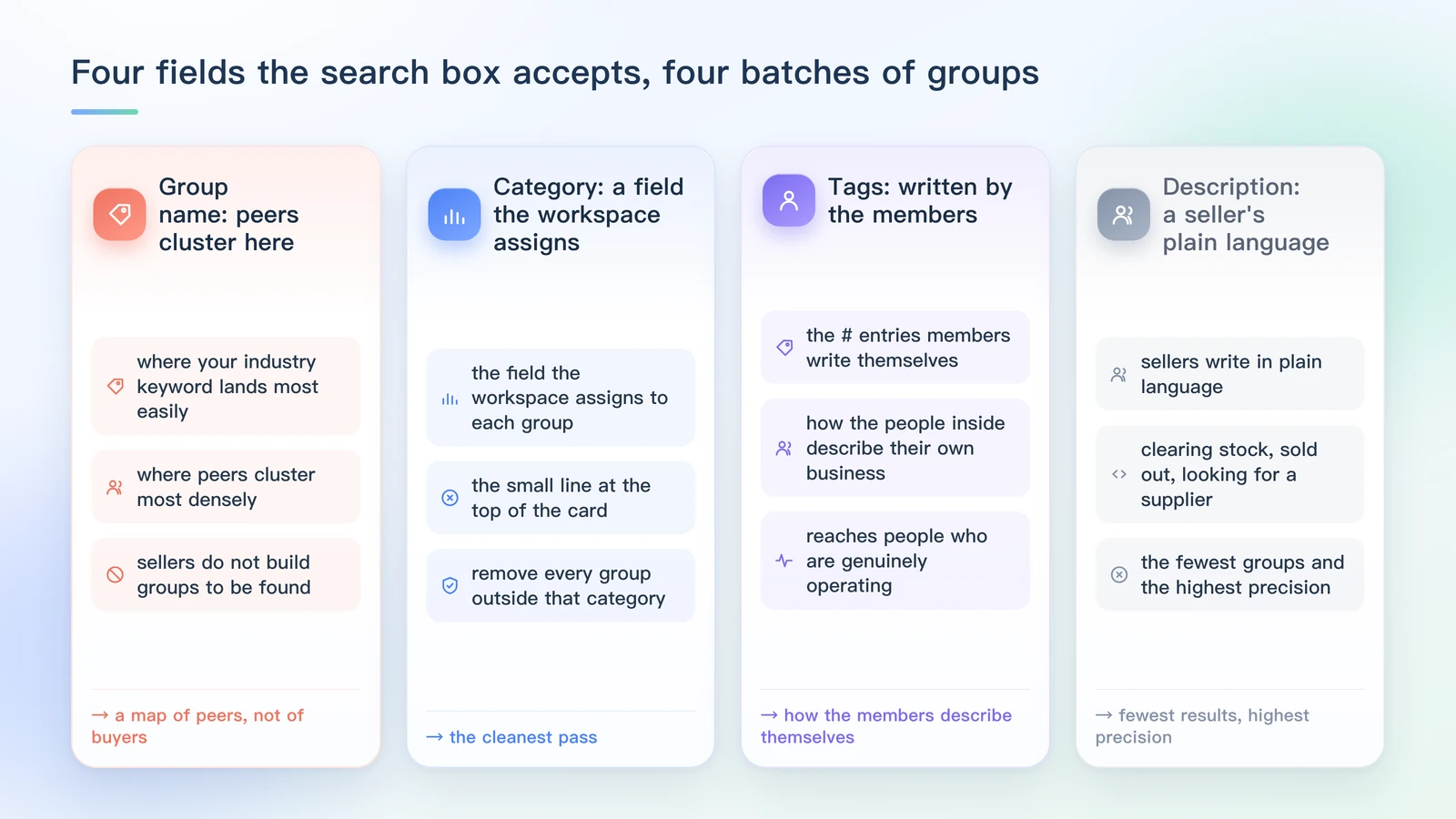
2. The search box accepts four things
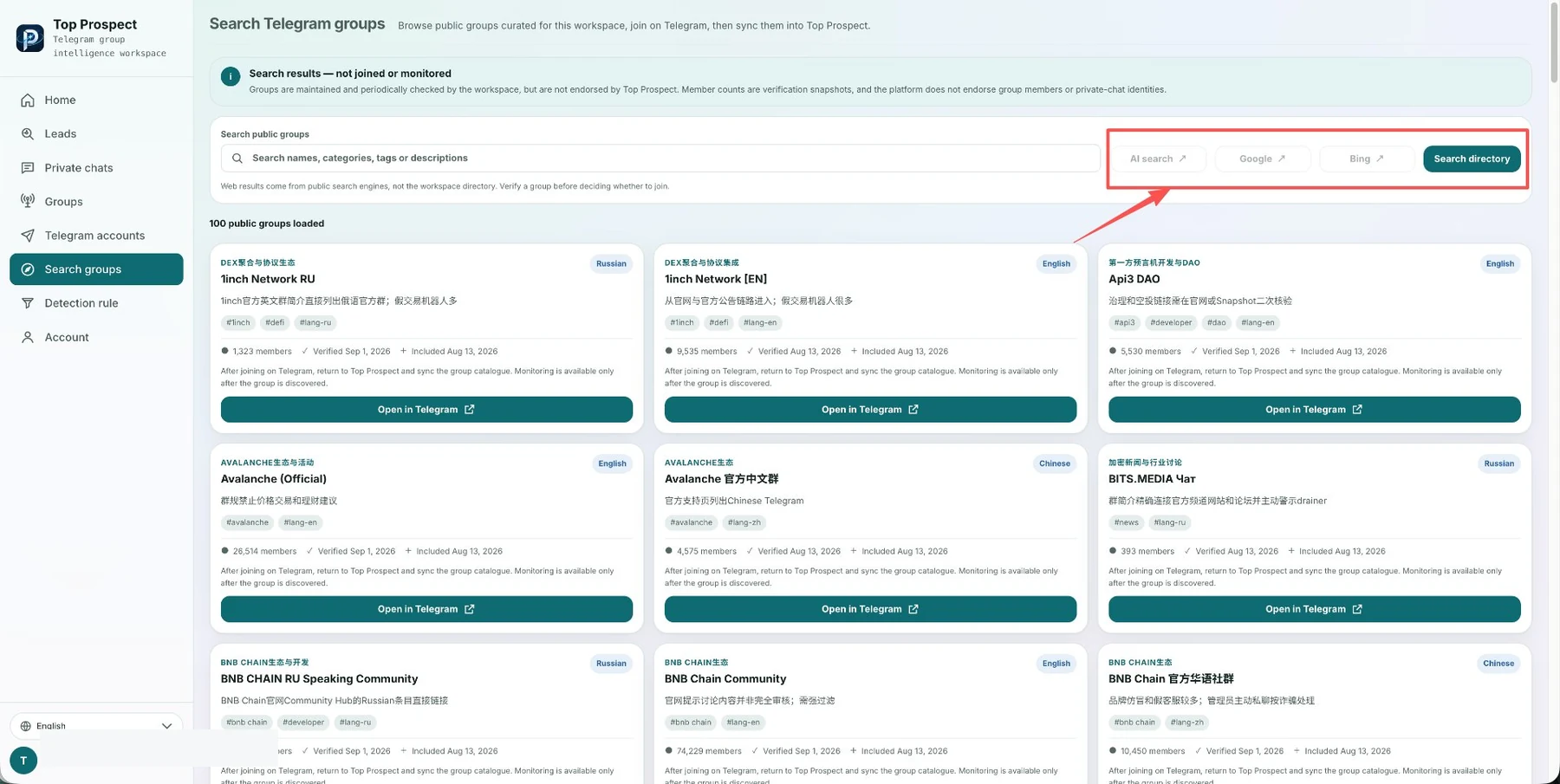
The interface states it plainly: search names, categories, tags or descriptions.
Four inputs, four different ways of writing:
Group name is where your industry keyword lands most easily, and also where peers cluster most densely.
Category is the field the workspace assigns to each group, shown as the small line at the top of the card. Filter by category and you remove every group outside that category in one pass.
Tags are the # entries members write themselves, sitting under the description. They record how the people inside describe their own business.
Description is the group’s own summary text. Sellers write in plain language — clearing stock, sold out, looking for a supplier, comparing logistics — and searching those words reaches people who are genuinely operating.
Search matches across all four at once. Change one and you get a different batch.
3. Four rewrites, one field at a time
Same search box, four different inputs, four entirely different result sets (illustrative example).
Rewrite one: an industry word. This means terms like “cross-border e-commerce.” What it produces is a map of your competitors. Its value is showing you which groups agencies are fighting over, not where buyers are.
Rewrite two: a platform or category word. Swap the industry term for platform and category names. Seller-run groups are more likely to carry platform names, because sellers operate per platform and discuss per platform.
Rewrite three: a category filter. Click a category in the directory’s filter area and cut the pool by kind. This produces the cleanest set, because the category is a field the library assigns, not text the owner writes to attract traffic.
Rewrite four: plain-language words from descriptions. Use the words sellers actually write in their own summaries: clearing stock, sold out, looking for a supplier, comparing logistics, which route to use. This step returns the fewest groups and the highest precision.
Four rewrites in, you are no longer holding one list of group names. You are holding four candidate pools cut from four different angles.
4. What changes once you rotate the fields
Run the same set of words through all four fill patterns and the overlap stays low (illustrative example). The reason is simple: one field only covers one way of naming a group, four ways of naming correspond to four reasons for building one, and overlap follows.
The real payoff is downstream. Once the fields are rotated, the card fields become usable.
Every result card carries the same set: category tag, group name, description, #tags, member count, last verification date and inclusion date. Read them in this order:
Check the category tag against your client’s category first. Then the primary language — keep English groups for Europe and North America, keep the matching languages for Southeast Asia. Then the member count, without chasing size. Finally the last verification date and inclusion date, which tell you whether anyone has maintained the group recently.
5. How to tell you searched correctly
Three self-checks. If any one fails, go back and rotate the field.
One: the share of peers is falling. If the first page is still more than half advertising, you are still circling inside industry vocabulary.
Two: group names start carrying platform names and category slang. Names about clearing one market or stockpiling one category mean you have reached where sellers talk among themselves.
Three: category tags line up with your client’s category. If your clients run direct-to-consumer stores and every result is platform resellers, your search direction needs adjusting.
One boundary is worth keeping in mind: results from the web entries come from public search engines, not the workspace directory, so verify before deciding whether to join. The directory entry returns groups the workspace has already indexed and re-checked, with a verification date on every card. Do not treat the two as the same batch.
Conclusion: stop treating Telegram as a group-joining channel
Most BD Telegram workflows are still, at heart: find groups → join groups → wait for customers to appear. The problem is that customers do not appear just because you joined a group. What deserves attention is the small changes happening in groups every day: someone starts looking for a supplier; someone asks about alternatives; someone complains about a current product; someone states a purchasing need outright; someone is looking for an answer before a decision. Those are the signals worth following. So instead of spending hours a day hunting for more groups, build a mechanism that keeps surfacing demand signals. The group is only the entrance. The signal is the lead. That is the step Top Prospect sets out to solve.
Frequently asked questions
I typed 'cross-border e-commerce' into the search box. Why am I getting peers?
Because optimised group names are the part you can reach. Agencies want to be found, so they put industry keywords into the group name and description. Sellers do not build groups to be found, so their group names are brand names or category slang with no industry keyword at all. Rotate the field you fill in and you reach the second group of people.
What is the difference between a category and a tag?
They come from different places. The category is the field the workspace assigns to each group, shown in the small line at the top of the card. A tag is a `#` entry the members write themselves, shown under the description. The first tells you what kind of group it is, the second tells you how the people inside describe their own business.
Hundreds of results came back. Do I have to join all of them?
No. Search results do not mean you have joined or enabled monitoring — whether to join is your call. Filter by primary language and member count first, then read descriptions and `#tags`. Twenty or thirty well-matched groups will keep you busy for a long time.
Sources and further reading
This article is human-authored. TOP Prospect processes only Telegram groups the user has explicitly authorized and connected. Its output supports human sales judgement; it does not replace human decisions and does not automatically contact or message group members.
How a Signal worth attention is found
See how Top Prospect finds and organizes Signals worth checking, keeps the original Telegram context, removes duplicates, and helps you decide what to review first. You decide whether to follow up and what to do next.