A “we need DDoS protection” message is worth $50,000. How do IDC sales see it first?
Groups with “DDoS” or “cloud hosting” in the name are usually the wrong place to look for buyers. This is a reusable sequence: use an AI tool to pull a candidate list of groups, verify each one against member count, last verification date, and indexing date, and only then set up an identification rule.
Signals to watch
- A candidate group list comes from AI and must be verified one by one before joining
- Verification rests on member count, last verification date, and indexing date, not on the group name
- Identification rules are created through a conversation, not by writing keyword expressions
- Matches are ranked by score, which is how you judge whether a rule needs adjusting
Most IDC sales teams look for customers on Telegram the wrong way from the very first step.
The problem is not the pitch, and it is not the product. It is that they look for the wrong groups.
Search Telegram directly for “server”, “cloud hosting”, or “DDoS protection”, and the groups that come back are rarely what their names promise:
- 40% are long-dead “zombie groups” (the last message went out three months ago)
- 30% are a “scrapyard” of competitor ads (more people selling servers than buying them)
- 20% are pure technical discussion (developers arguing about code and architecture, not procurement)
- Only 10% are quality groups where real buying decision-makers (ops leads, CTOs) are actually active
In the wrong groups, even the best capture tool catches nothing.
The first step is not to work out what to post. It is to decide where the right people are.
We wrote a separate breakdown of how a community turns into a dead group or an ad channel, so we will not repeat it here.
1. Why traditional group search doesn’t work in IDC
IDC (Internet Data Center), CDN (content delivery network), and cloud hosting is a narrow, technically driven field. The real buyers (game studio ops, SaaS startup CTOs, app developers) sit inside specific technical circles, not in public groups whose names carry big words.
- Group names lie: a high-quality procurement group may be called “Q4 Game Launch Crunch” or “Cloud Native Architecture”, which is not something “DDoS protection” will ever surface.
- Too much competition inside: in a public “cloud server chat”, 70% of the traffic is IDC reps mailing each other price sheets, and the real buyers muted it or left long ago.
- Manual verification is expensive: even if a search engine hands you a list of group links, clicking through them only gives you an eyeball check: how many members does this group have, when was it last verified, has it ever been indexed. That information is scattered, and there is no single place that shows it together.
Reading a single message well is a separate skill, and we wrote a breakdown in this same domain about stitching together three messages from one company that are scattered across three groups.
2. Demo: using an AI prompt to “pick up” 30 precise developer and ops groups
This is where AI tools (Google Gemini, Perplexity) earn their place. They read public information across the web and surface the groups that already have some backing behind them.
The core trick: ask the AI for groups backed by a YouTube channel or a GitHub project.
You can copy the prompt below and send it to an AI assistant:
“I need Telegram groups related to game development, app development, DevOps, and cloud computing. Requirements:
- Each group must be backed by an official channel or a well-known creator on YouTube, or by an active GitHub open-source project.
- English-language groups preferred.
- Provide the group link, the group description, and the sub-niche it belongs to.
- Give me 30 at once, grouped by sub-niche, so I have enough to work with.”
The AI will hand you a structured list. In our own run, it covered five core sub-niches of the technical services market:
1. Game development and server deployment (8 groups)
These are built by YouTube creators or GitHub maintainers who cover Unity and Unreal development and game server architecture, and the members are mostly real studio ops people and lead programmers.
- Unity Developers Community: run by a creator focused on game engines, discussing server architecture and load balancing
- GameDev Server Hosting: concentrated on game server deployment and picking DDoS-protected nodes
- Indie Game Dev Network: indie developers who talk about cloud hosting cost optimization
2. DevOps and cloud-native architecture (7 groups)
Groups for operations engineers, SREs, and cloud architects, covering AWS, GCP, Azure, and self-hosted data center options.
- DevOps Engineers: operations professionals discussing multi-cloud strategy and CDN tuning
- Kubernetes & Docker: cloud-native practitioners discussing container deployment and server operations
- Cloud Architecture: cloud architects discussing SLA (service level agreement) requirements and disaster recovery
3. Startups and technology selection (6 groups)
Groups for SaaS founders, CTOs, and technical leads, discussing infrastructure cost and vendor selection.
- Startup Tech Stack: technical leads at startups discussing server selection
- SaaS Founders: SaaS founders discussing infrastructure cost optimization
- CTO Network: technical directors discussing vendor selection and SLA requirements
4. Mobile apps and backend architecture (5 groups)
Groups for iOS and Android developers and backend engineers, discussing API (application programming interface) gateways, cloud services, and CDN acceleration.
- iOS & Android Dev: mobile developers discussing backend APIs and cloud services
- Flutter & Firebase: Flutter developers discussing Firebase alternatives and self-hosted backends
- React Native Backend: React Native developers discussing backend architecture
5. Web3 and decentralized infrastructure (4 groups)
Groups for blockchain developers and node operators, discussing server security, DDoS protection, and IPFS storage.
- Web3 Infrastructure: a Web3 infrastructure group covering node deployment and IPFS
- Blockchain DevOps: blockchain operations people discussing server security and DDoS defense
(Note: the entries above are illustrative of the shape of what an AI returns. Group names and links are generated on the spot from public information and may have been renamed, turned private, or never existed at all — which is exactly why the next step is to verify every single one.)
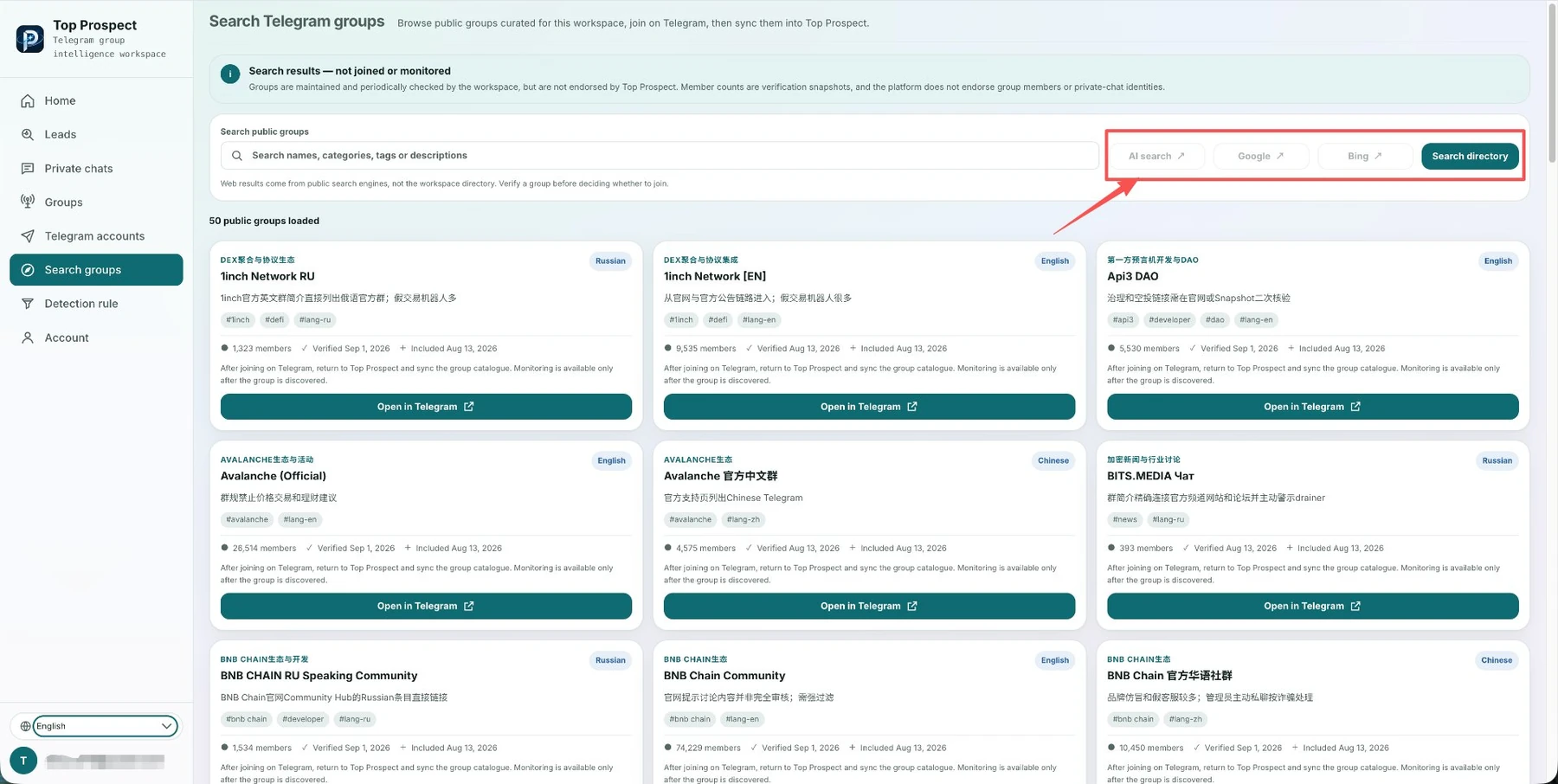
The screenshot shows the TOP Prospect group search page. On-site search queries the library of indexed public groups, while AI search, Google, and Bing cover what the library has not indexed yet; a result card reflects only the snapshot from the most recent verification.
3. The turning point: groups AI finds cannot be used directly
Here is the part that matters most: what AI finds is a candidate list, and every entry still needs a second pass.
Why? Because AI cannot verify any of this in real time:
- Whether the group still exists and whether anyone maintains it
- Whether the name and the link actually match (the entries above were generated on the spot)
- What the group has been discussing lately, and whether any of it is real business
This is what Top Prospect is for. It does not replace AI; it takes over and amplifies what AI produced.
4. Best practice: AI finds, then verify and capture
For a demand generation team at an IDC provider, the smartest approach connects the two into a single sequence:
Step 1: pull groups in bulk with an AI tool (8 minutes)
Use Gemini or Perplexity and the prompt above to get a candidate list of 30 to 50 groups backed by a YouTube channel or a GitHub project.
Step 2: verify each one on the Top Prospect group search page (15 minutes)
Put the group names from the AI list into the on-site search, one at a time. The result card gives you directly:
- Whether the group has been indexed, and what its member count is
- When it was last verified, and when it was indexed
- Which category tag it sits under and what its main language is
If a search returns nothing, the group has not entered the index yet, so you can leave it alone instead of clicking through. One line on the card is worth remembering: a search result does not mean the group has been joined or that signal collection is enabled, and group data is only a snapshot from the most recent verification.
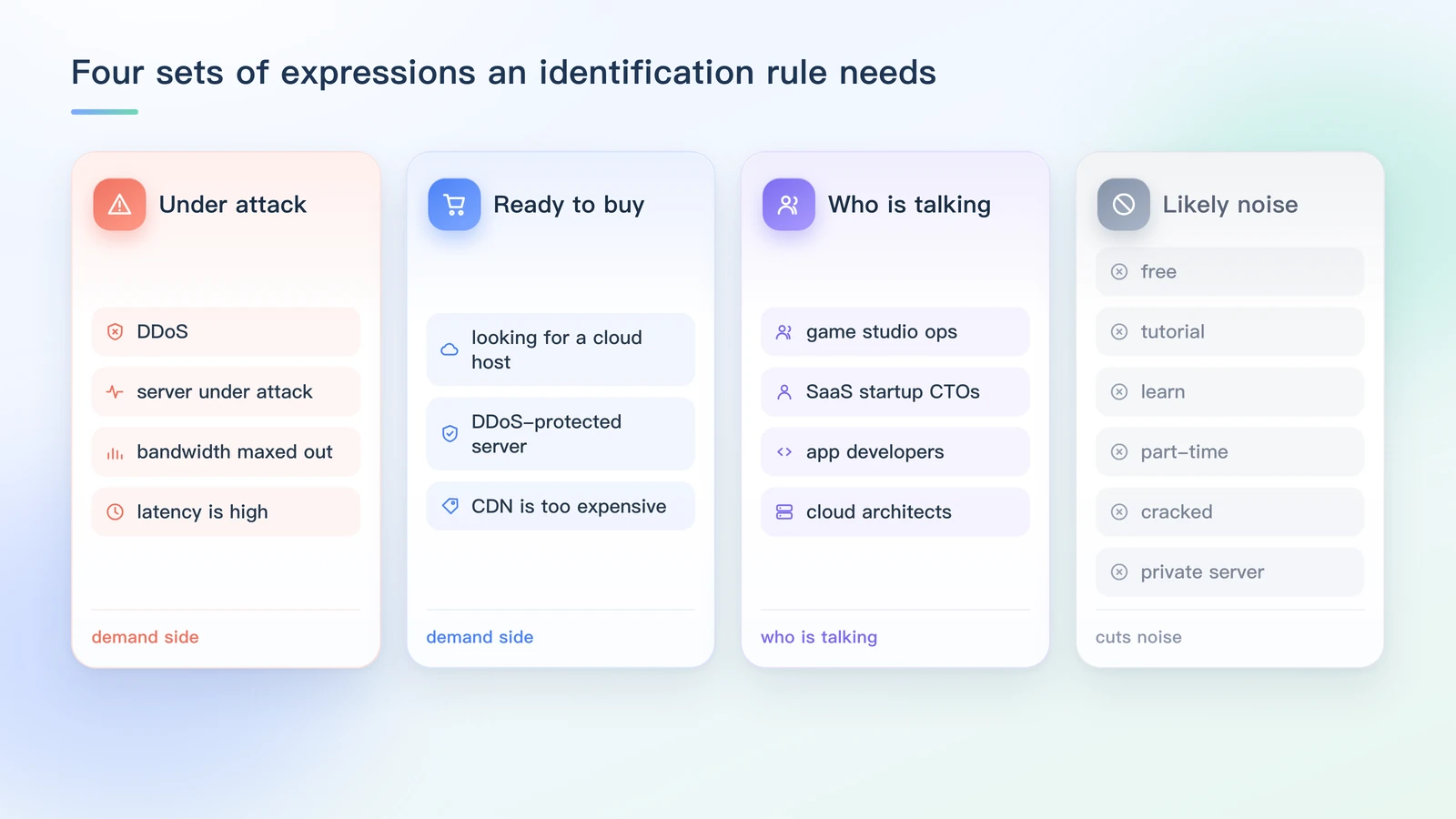
Four sets of expressions: the first two feed the demand side of the rule, the third tells you who is speaking, and the last one is the noise to filter out. Every term comes from the expressions listed in step four above.
Step 3: fill the gaps with Google and Bing (10 minutes)
Click the Google button in Top Prospect and run site:t.me “game server” OR “DDoS protection” OR “cloud hosting” to find the newer groups that neither the AI nor the on-site search surfaced. The site: operator used here is officially supported by Google; the full list is in Google Search Help.
Step 4: create an identification rule (5 minutes)
Creating a rule in Top Prospect does not involve writing keyword expressions. The system walks you through four questions in a conversation: whether you are looking for customers or suppliers in groups, what product or service you provide, who the people you are looking for are, and what you care about most. Once you answer, the rule runs against the groups you bound it to.
What you should have ready in your head is the vocabulary itself:
- Likely to signal demand: “DDoS”, “server under attack”, “looking for a cloud host”, “CDN is too expensive”, “bandwidth maxed out”, “DDoS-protected server”, “latency is high”
- Likely to be noise: “free”, “tutorial”, “learn”, “part-time”, “cracked”, “private server”
Matches are ranked by score after a rule runs, which is how you decide whether a rule needs adjusting. Keyword matching versus semantic matching is a separate question, and we wrote the boundary down in another piece.
Total time: under 40 minutes.
The result: a pool of 30 to 40 quality developer and ops groups, with the system now watching it around the clock.
5. One week, two sets of math: 20 hours of trial and error vs 40 minutes of setup
Compare the actual output of the two workflows:
Manual group hunting (one week)
- Time spent: 4 hours a day, 20+ hours total
- Groups covered: 20 to 30 (most of the time goes into trial and error and scrolling)
- Useful leads: 0 to 3 (easily buried under 999+ unread messages)
- Follow-up state: by the time you spot something, the best moment to respond has passed
AI plus Top Prospect (one week)
- Time spent: 40 minutes to build the pool on day one, then 30 minutes a day reading leads
- Groups covered: 50+ (verified and on target)
- Useful leads: 20 to 30 (the system extracts summaries with context)
- Follow-up state: you open the conversation during the golden window, with the message context and background already in hand
The core difference:
- Lead purity: exclusion rules plus context analysis filter out more than 90% of the noise.
- Reusability: the sequence becomes a team SOP. A new hire can pick it up on day one, and so can a founder who still prospects personally.
The part the platform actually takes over
The group search and signal capture features in Top Prospect are not about helping you join more groups. This layer solves for quality, not quantity:
- Save your time: hand the mechanical work (finding groups, verifying them, reading messages, doing the first screen) to the system.
- Raise your hit rate: only enter groups where real business discussion happens, and only capture signals that carry an explicit need.
- Build a system: move from joining groups at random to running a predictable, reusable process.
Once that sequence is running, the next question changes: a hosting switch request that has already appeared in a group — is it worth chasing today? We wrote that judgment call out in detail in a scenario.
There is only one end goal: find you customers.
AI tools do the finding. Top Prospect does the filtering and the catching.
The first widens your reach; the second raises your conversion.
Connect the two and the sequence actually runs.
This article is human-authored. TOP Prospect processes only Telegram groups the user has explicitly authorized and connected. Its output supports human sales judgement; it does not replace human decisions and does not automatically contact or message group members.
How a Signal worth attention is found
See how Top Prospect finds and organizes Signals worth checking, keeps the original Telegram context, removes duplicates, and helps you decide what to review first. You decide whether to follow up and what to do next.