Scan 100 SaaS going-global groups in 3 hours — bookmark this for localization newbies
The old way: 37 groups joined in week one, only 2 contained clients. The 3-hour routine: keyword sheet, four search entries, field-by-field verification — 100 SaaS going-global groups scanned, the 41 client-dense ones kept. Newbies can copy it line by line.
My localization prospecting week one, in numbers:
I applied into every group I could find — 37 joined. Inside: peers, translators, recruiters. Groups actually containing my buyers (SaaS founders and product leads): 2.
Week two I changed the approach: stop chasing group count, spend 3 hours running a process. Result: 100 SaaS going-global groups scanned, 41 client-dense ones kept (illustrative example).
This post unpacks the 3 hours hour by hour. Newbies can copy it line by line. Bookmark first, run second.
First 30 minutes: write the keyword sheet right
Time goes on the blade, and the first blade is keywords. One principle:
Search the client’s industry, not your service.
Groups found via “localization” or “translation” may be full of professionals — but none of them buy from you. SaaS founders talking about going global use their own words:
Going-global action words
go global / overseas expansion / global launch / international expansion / internationalization
Product-role words
SaaS founder / product manager / indie hacker / software going global
Language and market words
i18n (short for internationalization) / multilingual / l10n / localization / Japan market / MENA market
Blocker words
app store rejection / multilingual support / documentation translation / churn
Four groups into one note; every search entry will rotate through them.
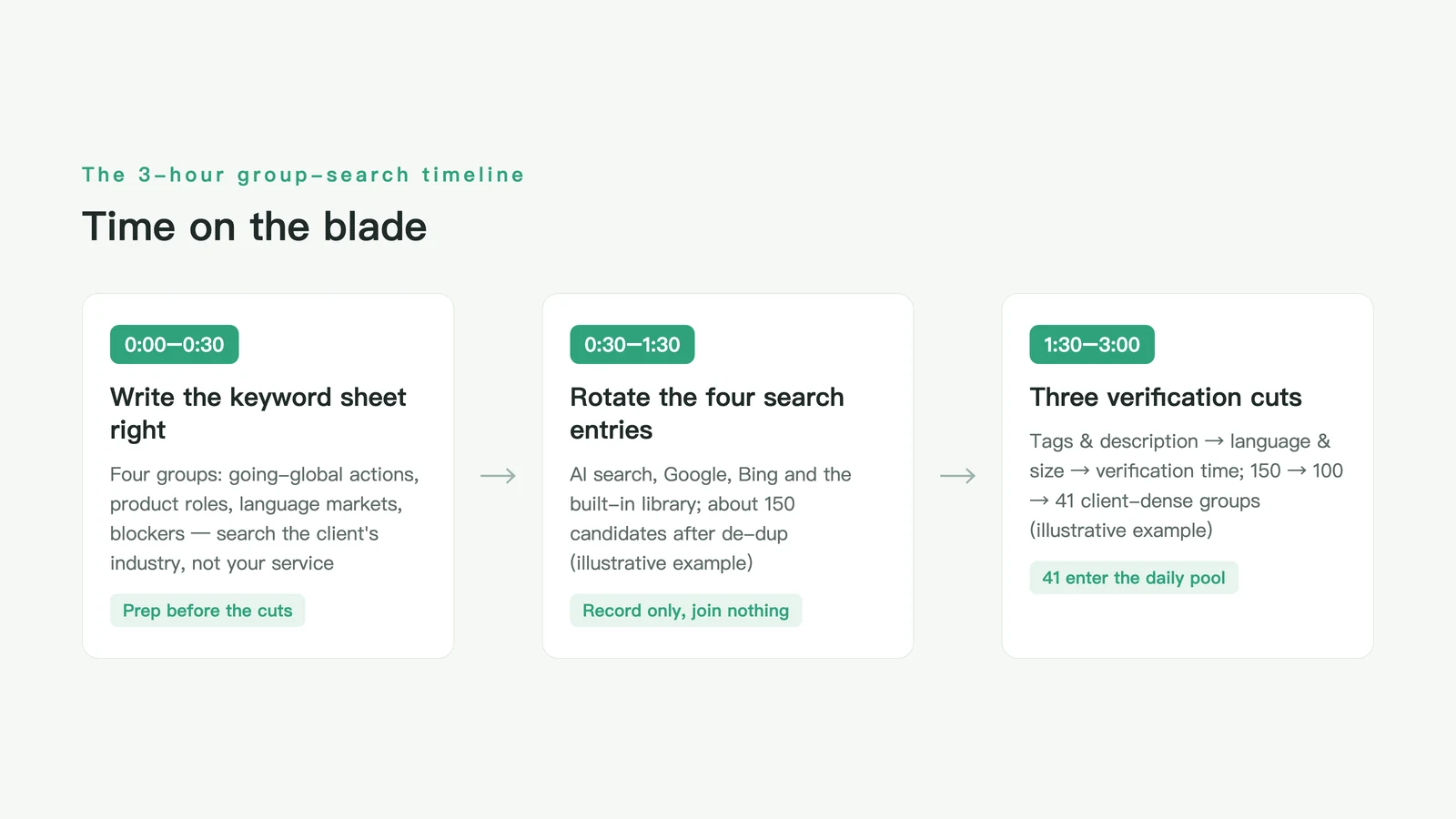
Second hour: rotate through the four search entries
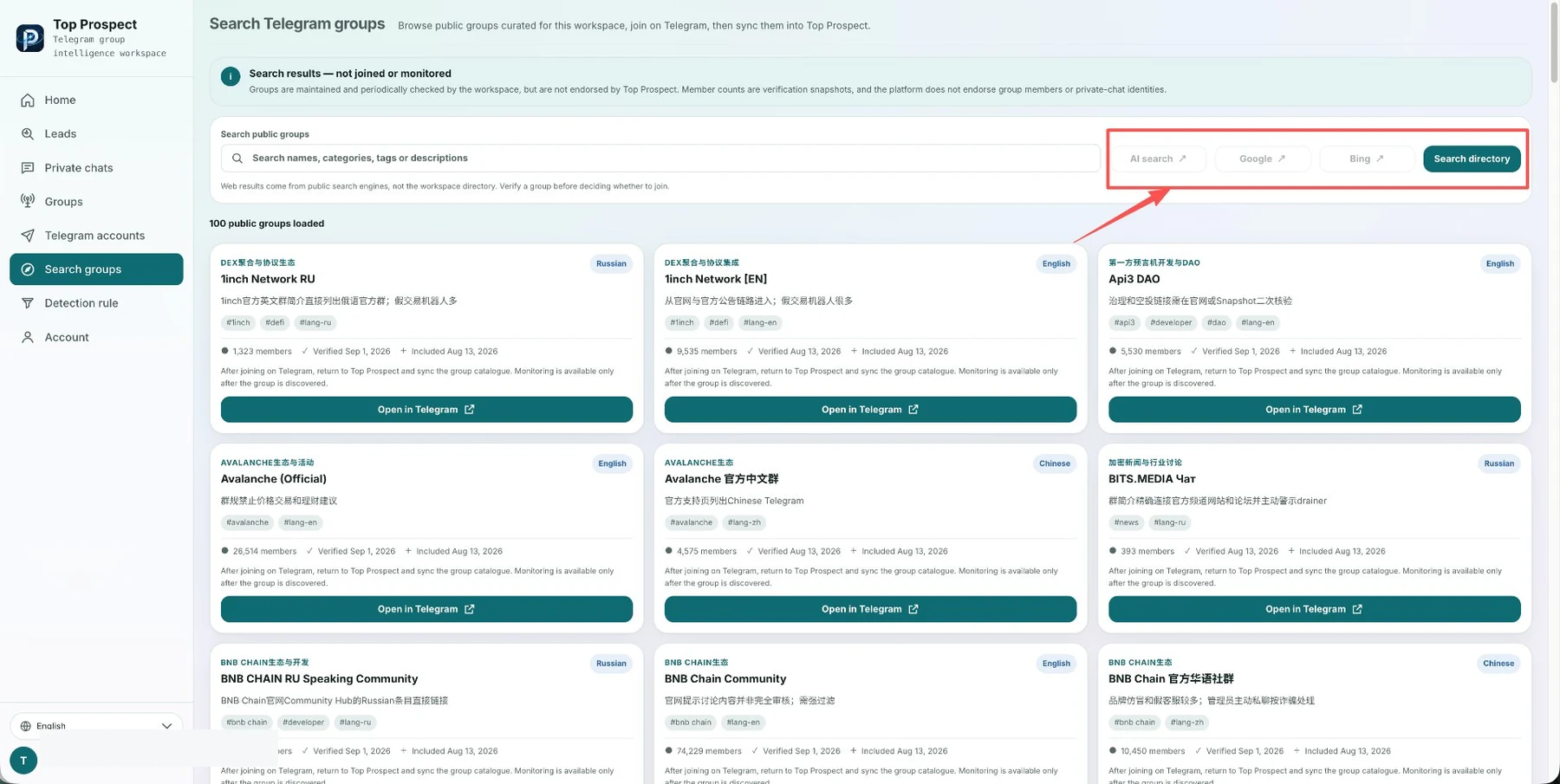
Keywords ready — start searching. I go straight to the TOP Prospect group search page, where the four entries split the work:
AI search: describe the need in one sentence — “Telegram groups where SaaS founders discuss going global, in English” — and it decomposes and searches on its own.
Google: the system pre-fills the site:t.me operator; combinations like “SaaS + go global” surface groups that never make the usual lists.
Bing: same idea, different index — use it specifically to catch what Google missed.
Built-in group library: 100 public groups already loaded, filterable by category tags and primary language — sweep the library first without typing a keyword.
After the four entries and de-duplication: about 150 candidate groups (illustrative example). At this stage do not apply to join anything — just record group name, description and category tags.
Third hour: verify by field — cut 150 to 100, then to 41
Candidates in hand, this hour is subtraction. TOP Prospect result cards carry seven fields: group name, description, category tags, primary language, member count, last verified time, indexed time.
Three cuts:
Cut one: description and category tags. Descriptions saying “assignment help” or “trading signals” — delete. Tags that don’t match SaaS, startups or going global — delete. 150 → 110.
Cut two: primary language and member count. Your buyers discuss in English or Chinese; pure small-language groups wait. Below 500 members the discussion density rarely holds. 110 → 100.
Cut three: last verified time. Long-unverified groups may have been renamed, resold or gone dead — prefer freshly verified ones. From the 100, keep the 41 whose descriptions clearly seat your buyers (SaaS, indie hacking, product management).
Those 41 are the pool you sweep daily starting tomorrow. The other 59 go into low-frequency observation.
After the pool: recognize exactly one kind of message
The pool isn’t for chatting — it’s for waiting on one kind of message:
“Our app is launching in Germany, privacy policy and support need to be in German — anyone done this recently?”
A SaaS founder never says “I need localization services”; they complain about a concrete blocker: store rejection, support drowning, unread docs. When a message contains a specific market and a specific blocker, that message is your opening.
DM right away? First judge three things by hand: founder or lurker, do you actually serve that market, is their blocker your strength. Judge first, then reach out — and open by answering their blocker, not with a company intro.
Bookmark this checklist and run it tomorrow
- Four keyword groups: going-global actions, product roles, language markets, blockers;
- Four rotating entries: AI search, Google, Bing, built-in library (100 public groups, filtered by category tags and primary language);
- Seven verification fields: group name, description, category tags, primary language, member count, last verified time, indexed time;
- Three subtraction cuts: tags → language & size → verification time;
- One message type that counts: specific market + specific blocker;
- Human judgment before outreach, first sentence answers the blocker.
Week one: 37 groups, not one client. Week two: 3 hours, 41 groups with clients inside. The difference isn’t effort — it’s process. Bookmark this, and the next time someone asks how to start localization prospecting, send them the checklist.
Frequently asked questions
Why search SaaS going-global groups instead of localization groups?
Localization groups are full of peers and translators. The people who buy localization are SaaS founders and product leads, and they discuss going global in their own industry groups — app-store rejections, multilingual support, doc translation, all surfaced as complaints.
Do I have to watch all 100 groups daily?
No. The 3-hour routine produces two layers: the 41 client-dense groups get a daily message sweep, the rest sit in a low-frequency watch pool. Rotate the pool every two weeks — move out groups that never produce client messages, bring in new ones.
As a newbie without a client profile, how do I judge a group?
Open the last two weeks of announcements and hot threads, and count one thing: are founders discussing going-global decisions — market selection, language priority, compliance? Groups with those threads are good groups; size matters much less.
Sources and further reading
This article is human-authored. TOP Prospect processes only Telegram groups the user has explicitly authorized and connected. Its output supports human sales judgement; it does not replace human decisions and does not automatically contact or message group members.
How a Signal worth attention is found
See how Top Prospect finds and organizes Signals worth checking, keeps the original Telegram context, removes duplicates, and helps you decide what to review first. You decide whether to follow up and what to do next.